While I’ve known for a few decades that the standardized maximum specified length for Ethernet over Cat 5e cable is 100 meters/328feet, I’ve always wondered: what if a cable is run longer?
As I’ve written here before, I learn best through experience and experimentation (for example, see my recent post and video on what happens if line voltage gets into an Ethernet switch, and my recent investigation of multicast). So, in preparation for the eventual next edition of my Introduction to Show Networking book, I figured I’d continue this exploration process, try it out, and share the results here.
Here’s the companion YouTube video for this post:
Where does the maximum length come from anyway?
The Ethernet standard was developed and is maintained by the IEEE 802 LAN/MAN Standards Committee (LMSC). The standard is now more than 7,000 pages (!) long, but in section 40.7.1 it states that for 1000BASE-T (Gigabit) Ethernet to reference ANSI/TIA/EIA-568.
TIA’s 568 “Generic Telecommunications Cabling for Customer Premises” standard specifies cable parameters and install practices for many types of electrical data communications circuits that use balanced transmission. The latest revision at this writing is ANSI/TIA-568.0-E-2020.
The length for Ethernet standards is specified in Table 5:
1000BASE-T (aka Gigabit, 1Gbps) Ethernet is the most widely used today, but modern Ethernet interfaces can still negotiate down to 100Mbps or even 10Mbps. In fact, some devices that only need limited bandwidth (such as a 2-channel audio adapter that only needs a few Mbps) often max out at 100. The maximum length for all of these signaling rates is specified at 100m, with the caveat from 568 section 10.2.2: “Many applications for balanced twisted-pair cabling have a maximum supportable distance of 100 m (328 ft) assuming a 90 m (296 ft) permanent link length and 10 m (33 ft) of cords with an insertion loss de-rating factor of 1.2.” This is why it’s generally recommended to only permanently install copper cables up to 90meters long.
Testing Process
For this experiment, I started with 1000 ft of Cat5E solid cable, terminated both ends and tested it. Then, I cut it down by some length, terminated and tested again. I kept doing this until my gear was able to negotiate 1Gbps, send PoE, and play audio using Audinate’s Dante without errors. It was a tedious process, but I learned a lot.
Here’s a timelapse of one termination/testing cycle (with some help from Popsicle kitteh!).
My Predictions
Starting out on these kinds of technical adventures, I like to make some predictions and see how they work out. I figured that I would get no connection at all until maybe about 150m, and then it might negotiate first only up to 10Mbps, and then as I cut off and re-terminated, I would eventually see something at 100Mbps, and then eventually 1000Mbps (Gbps). I figured PoE wouldn’t work until some distance further, maybe 140m or something. I was very surprised by the results (details below), but I should say in general that nothing I learned here would ever make me willingly run a copper cable longer than 100m!. But by pushing beyond the edge of operation, I learned a few things about failure symptoms that will be helpful in future troubleshooting.
Cable and Connectors
Note: All Amazon product links here are paid referral links; if you buy through them, I get a little kickback from Amazon.
For the test, I bought trueCABLE Cat5e Riser (CMR), 1000ft, Red, 24AWG 4 Pair Solid Bare Copper, 350MHz, PoE++ (4PPoE), ETL Listed, Unshielded Twisted Pair (UTP), Bulk Ethernet Cable. This cable is for “riser” applications and is a bit cheaper than “plenum” cable, which is made for applications where a higher fire resistance is needed.
I screwed two surface mount jacks to a board (recycled down from my line voltage into a switch project). Then each time I cut down the cable, I terminated each end using a 110 punch down tool into True Cable Gbps Cat6 RJ-45 Keystone Jacks, using the TIA-568B (most widely used) pin out.
I would have loved to do serious low-level certification testing of the cable, but, unfortunately, the equipment to do that is several thousand dollars and beyond my budget. So, I used my (sadly discontinued!) Platinum Tools Net Prowler tester for basic wire checks after termination, and then used my NetAlly AT1500 tester for more sophisticated tests. I found out some interesting things about this unit; see results below. Before starting, I used the NetAlly tester to check out all my patch cables.
For my networking workshops, I own two Netgear M4250-10G2F-PoE+ 12 Port GSM4212P AV switches and one M4250-8G2XF-POE+ 8 Port Switch GSM4210PD. These all max out at 1Gbps on their regular copper ports, so that was my upper limit for this test. I had originally figured I’d just connect the long cable between the two switches and that would be the test, but it turned out to be more complicated than that (see details in the results below).
Iperf3
For bandwidth testing on the terminated cable, I used the open-source Iperf3 software running on two PC laptops. With Iperf3, you can test the local internal transfer rate by connecting to the localhost (loopback) interface, and the laptops tested out at 41Gbps internally.
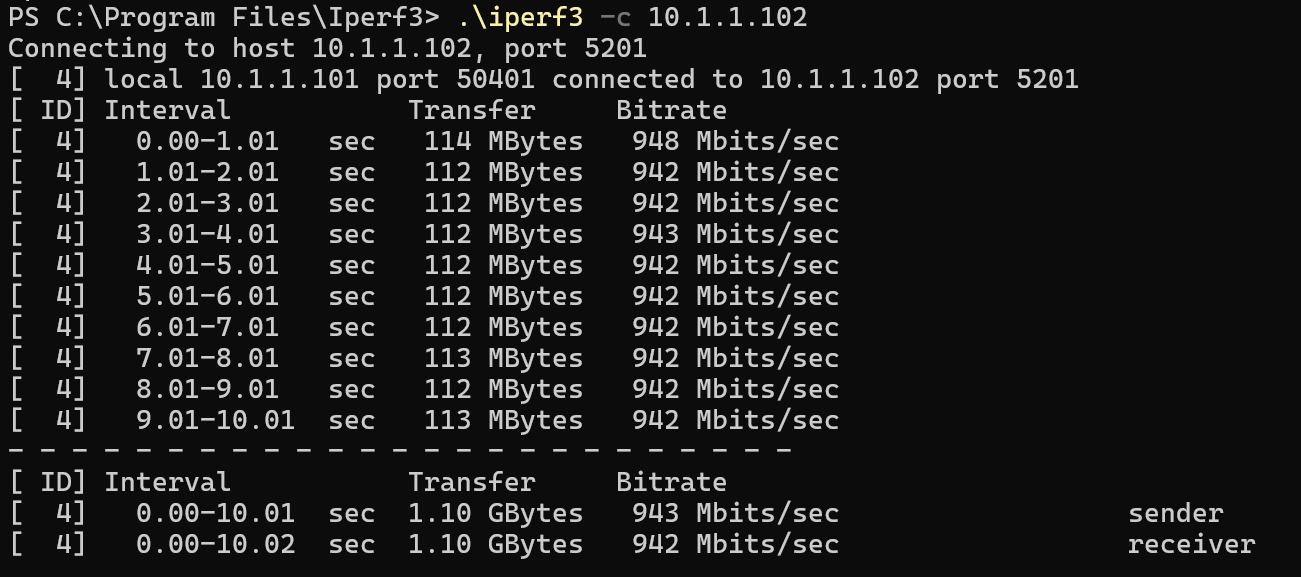
I tested directly between the two laptops and that came out around 943Mbps; next I tested through two Netgear switches connected with a short patch cable and got a similar result, so these switches are working pretty well.
And all this means that about 940Mbps should be the upper limit of what would be possible with the long cable.
Testing Beyond the Numbers with Dante
I wanted to test with something a bit more than numbers, and I’m glad I did (see results below). Once I got a link established, I used Audinate’s Dante to send two channels of 48kHz digital audio from a Mac mini running Virtual Sound Card, through the long cable, to a two channel Dante receiver output set at 1ms Dante latency, connected to a JBL speaker.
Power Over Ethernet (PoE)
The Dante receiver I own also runs on PoE, meaning its power is actually supplied by the switch, and so this device was useful both for testing the transmission and power delivery. My NetAlly tester also tests PoE, although I didn’t know it comes from the factory set off by default, so I missed a couple early lengths. PoE is also defined by the 568 standard to a maximum of 100m:
The Results and Surprises Along the Way
I started with the cable still in the box. I didn’t expect this to work, but it was an interesting baseline.
1000ft/304.8m Coiled
This was 205m/672ft over the standard, but the old reliable Platinum Net Prowler showed the test “failed” but got a measurement!
The NetAlly LinkRunner 1500 cable test, though, surprisingly to me came up with a failed test:
The NetAlly has a really cool feature called “Link-Live” where it will automatically upload results to a cloud server (and if you’re offline it will store them until you connect to the internet). The tester comes with a year of free service which is what I’m using. Some of the detailed results you’ll see here are from that cloud service, like this one, which shows the failed test with the lengths “unknown.”
I plugged between the two switches and got no connection, so I moved on.
996ft/303.6m Uncoiled
This was 204m/669 feet over the standard. (Note: The markings on the cable are every 2 feet, and I cut the ends off with the previously terminated connectors which is why this is a bit less than 1000ft.)
To make the overall test as reliable as possible, I wanted to uncoil the cable and get it as spread out as far as possible and away from potential sources of signal interference. So, I ran the cable downstairs, into the basement, out a window and then spread out in the backyard in a way I could pull repeated segments in without getting tangled. See the video below for the path:
The old Net Prowler tester measured out the cable perfectly fine!
(Note: the distances measured by the old NetProwler’s time domain reflectometer aren’t calibrated so I don’t know the accuracy, but I think they are useful in relation to other measurements from the same tester.)
The NetAlly cable test again came up failed/unknown.
The NetAlly also has a mode to test connections to a switch (that’s really what this tester is best at) but that wouldn’t connect either.
Connecting the long cable between two switches (not surprisingly) did nothing.
950ft/289.6m
I really had no idea at what length the cable might work, so I just tried cutting off various lengths. This time I cut it down to 950 feet to make something even, and got the same results as above.
The NetAlly still showed “unknown” and got no connection when connected to the switch (not surprising since this is more than 600 feet over the standard).
900ft/274.3m
I cut off 50 more feet, and got the same results.
821ft/250.2m
I cut off about 25meters this time, and got the same results.
740ft/225.6m
I cut off another 25meters this time, and got the same results.
664ft/202.4m
Since it was close to Halloween, I next picked 666 feet on the cable (since I cut the other end off to get it out of the box, the head end of the cable is actually at the 2 foot marking, so actual run length was 664 feet).
This was 102m or 336ft over the standard. It tested out fine on the Platinum tester:
And then when I used the NetAlly connection test it connected to the switch at 100Mbps!
The switch showed the 100Mbps connection as well:
I was surprised that this worked, since this is more than twice the standard maximum length. When I connected between two switches, it would try with the lights blinking, but never fully connect (the blue and purple cables are connected to the long cables).
However, I connected directly from a laptop through the long cable to the switch, it connected at 100Mbps! I was even able to run IPerf from the laptop to the switch over the long cable, and from the switch to the other laptop running the Iperf server, and it tested out at about 90Mbps (on a 100Mbps negotiated link).
This was really surprising to me, since, again, this was a little more than twice as long as the standard allows.
656ft/199.0m
I figured I was pretty close to getting a direct connection between the switches, so I only cut off a few meters, to make the cable just about twice the standard maximum length. It tested out fine on the Platinum tester.
The NetAlly tester cable test worked (at least for this test, see below), and showed 634ft.
This was the next morning after the previous test, and in the meantime I researched the NetAlly tester (I generally only read the manual after I’ve tried everything else) and realized that PoE testing comes from the factory disabled, and I had to go in and enable it, but it delivered PoE at this length:
Connecting between the switches it was flashing and trying, but never able to connect (as in the video above). But I was able to connect through the long cable to my Dante adapter (which runs at 100Mbps normally) and power it over PoE!
This was really surprising to me. Looking in Dante controller, it could see the remote device over the cable, but did not pass audio.
(Sorry for the quality, I forgot to screen shot this so this is from a documentation video)
When I connected between two switches, it would try with the lights blinking, but never fully connected.
I could connect from the laptop through the long cable, and run Iperf, and that again ran at about 90Mbps over the 100Mbps connection.
624ft/190.2m
I figured again I was close to full functionality, so I cut off just around 10m (note the cable is marked in 2-foot increments, so I never was cutting exactly to the meter).
This tested out on the Platinum tester:
Interestingly, the NetAlly cable test again failed at this length.
But it did test out again in a direct connection to the switch at 100Mbps.
And with Dante I got the same as at 200m, it could see the remote device, but not pass audio.
(While reviewing this, I noticed a typo in the “RX Utlizaton”)
But for the first time, I got a switch to switch connection at 1Gbps!
(Note: To simplify things, I turned off the Auto-trunking features in the Netgear AV switch for these tests.)
But this link was running on the edge, as you can see from the intermittent Iperf results (now run through the switches connected together with the long cable instead of from the laptop to one switch):
I forced the connection in the switch down from 1Gbps to 100Mbps, and interestingly, the average connection throughput actually got worse, although it connected more reliably.
592ft/180.4m
I cut another 10m off the cable. The trouper Net Prowler tester of course worked:
Interestingly, the NetAlly cable test again failed at this length.
But it did test out again in a direct connection to the switch, and now negotiated to the full 1000Mbps (1Gbps)!
And the Iperf results came through pretty well, around 900Mbps:
At this point intermittent, distorted audio came through on Dante (I used the public radio feed from WNYC so as to avoid copyright strikes) when connected from the Mac Mini to the switch, and out though the long cable to the Dante adapter.
558ft/170.1m
10 meters shorter, and the usual:
The NetAlly cable test failed again.
But the direct to switch tested out good at 1Gbps.
Iperf results were about the same, but through Dante I started get continuous but distorted audio coming through:
526ft/160.3m
From this point on, the NetAlly cable test worked. Interestingly, the lengths for all the subsequent cable test measurements came out a bit longer than the marked cable length (not sure if the velocity of propagation is set correctly?):
Dante audio would now come through continuously but with distortion on the louder passages:
Dante controller showed connection but errors in the device status:
492ft/150.0m
At this point I finally got smart and started putting a post it note in the photos to keep me from getting confused later. Again here you can see the tester showing longer than the cable marker.
At this point through Dante, I only got occasional distortion. I kept going until I got clean audio free of errors.
460ft/140.2
At this point, the audio (at least with this content) sounded pretty clean, but there were a few errors showing up in Dante controller:
428ft/130.5
This is almost exactly 100 feet longer than the 528 standard specifies.
Listening now, the audio was clean, and no errors showed in Dante after running audio for 10 minutes.
Iperf showed around 942Mbps, which was pretty close to running on a 1m connection cable instead of 30meters over the standard.
At this point I had spent way more time on this project than I thought (the tests were spread out over a few days around other obligations). So, I wrapped up the test, and wrapped up the cable (in the dark, hence the poor coiling job) and brought it inside. It actually worked just fine even coiled up at 130 meters, and I’ve listened to audio through it for a couple days (and music as I write this) and haven’t noticed a single glitch.
Conclusions
So, in my tests, the cable runs fine at 100ft/30m longer than the standard length. Does this mean that you should run Cat5e cables extra-long? I sure wouldn’t! This is one result with this particular brand of cable, connectors, and switches, brand new out of the box, run away from any significant interference sources, and with no intermediate connection points or patch bays. There weren’t any significant kinks in the cable and my bend radius was way larger than the 4x cable outside diameter specified in the TIA 568 standard.
But what I learned is that extra capacity in the cable is a useful buffer and an important cushion against other sources of signal degradation in the system. To me, if you need more than 100m (or higher bandwidth than 1Gbps), in most cases I recommend just running fiber. It’s cheap these days, has all kinds of advantages over copper, and is pretty easy to run for backbone operations (see my other post for an example).
It was fascinating to me that the laptop, the Net Ally tester, and the Dante PoE output would all connect at longer lengths than the two switches would connect. I’d love to hear from someone smarter than me about low level electrical signal transmission about why that might be the case.
Here’s my notes from each test:
AI Note: Like everything I do, I wrote every single word of this. I did use Google Gemini to check for grammar, spelling and for an accuracy/fact check. And I used Gemini to generate the YouTube thumbnail.