Upgrading the Office Connection from Wifi to Bi-Directional Fiber
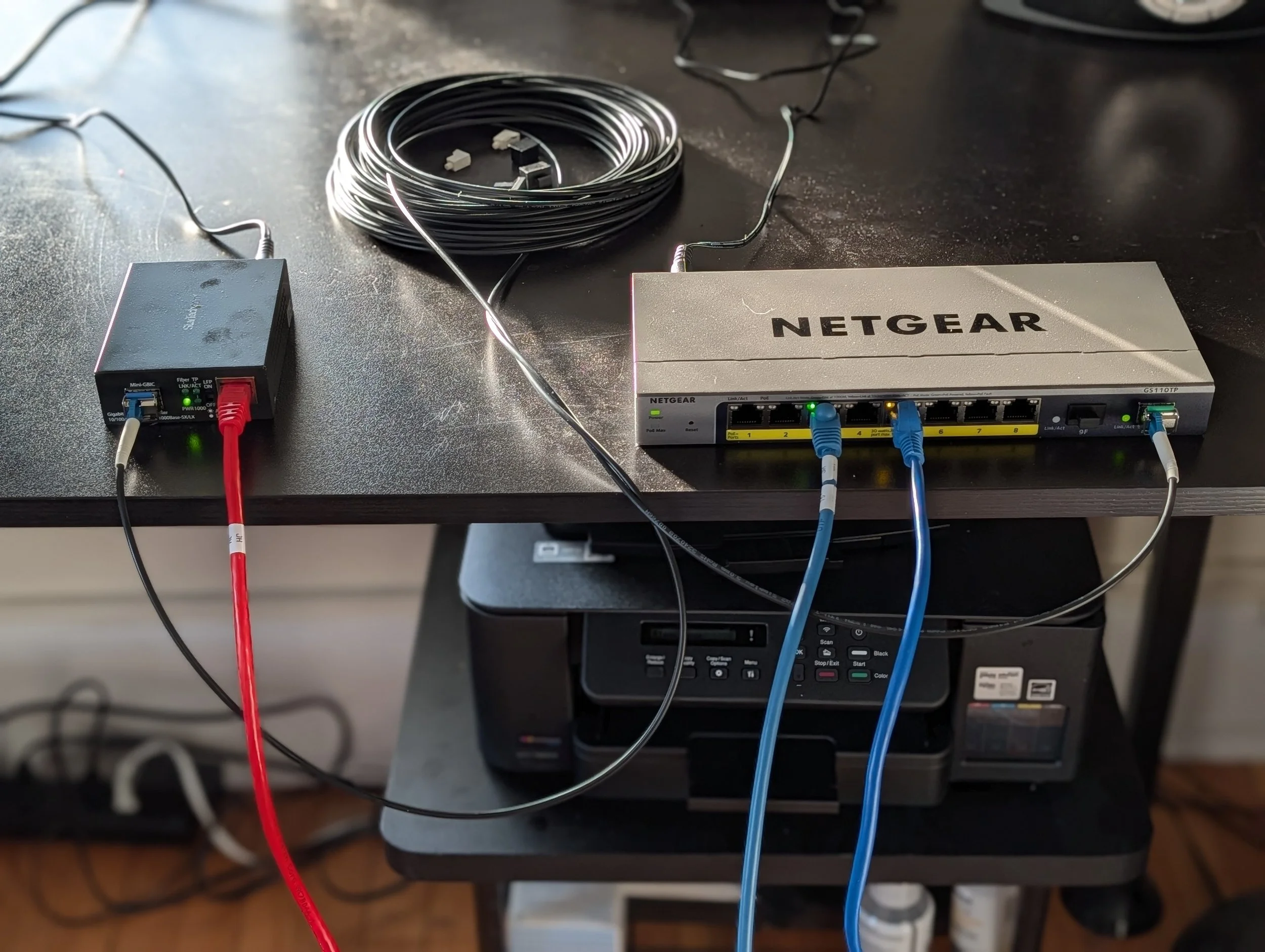
I’ve long been fascinated by fiber optics for data com stuff. My first experience was back in 1986, when we built an optical fiber “torture test” for trade shows for Corning (pictures here). That device used unjacketed fiber to send (analog) video from one side of the display to the other, and, on the way, the fiber was frozen, zapped, stretched, heated and drenched, and always worked perfectly. The only thing we could do to break it was crush it or tie in in a tight knot. So fiber, being electrically immune and capable of extraordinarily high bandwidth is amazing; people often think it’s delicate, but pro-grade tactical fiber is as durable as a cat 5 or mic or DMX cable. The only pain in the ass about fiber—then and now—is terminating it. The best way these days is to pay about $800 for a fusion splicer (paid referral link), which welds fiber to connectors pre-terminated at the factory. But if you can’t invest in a fusion splicer (I’m personally looking for an excuse to buy one), these days you can just buy pre-terminated fiber even on Amazon, so it’s pretty easy to experiment with.
I moved last year, and to get things up and running I just put my main computer on wifi. I then got stupid busy and left it, but this week finally got time to run a cable up from the router downstairs. Even though the run was only about 50 feet and I could have easily run copper, since this is a rental I can’t run cable through the walls. So it’s actually easier to cleanly run a tiny little fiber temporarily. I’ve worked a lot with dual-LC fiber SFP adapters and own a bunch, but after talking to Chris Conti at USITT about using bi-drectional (“bidi”) fiber adapters for his big game network (article and diagram here), where he had limited house fiber, I figured this was a good application to try them out. These adapters use different wavelengths (colors) of light to send and receive over a single fiber cable.
I got a StarTech Multimode / Single Mode Fiber Media Converter for about $50 (paid referral link here) to put down by the router. These come in 10 Gigabit or 1 Gigabit models, since this is just running to a Gigabit router I just got the simpler, cheaper 1Gb version.
I also got a pair of $20 10Gtek 1.25G SFP Bidi Transceivers (paid link) that work in SFP (Small Form-factor Pluggable/Mini-GBIC) interfaces.
These run in a pair with the light transmission at two different wavelengths, one for each direction: Up: TX1310nm/RX1550nm; Down: TX1550nm/RX1310nm. And these little adapters are rated for up to 2km (on single mode fiber)!
Note: My friends in show switch tech support tell me that these little cheap SFP adapters often burn out, and for show purposes you should use a heavier-duty model recommended by your switch manufacturer. Chris said that they treat their bidi adapters as expendable.
For the office end I put a $150 NETGEAR 10-Port PoE Gigabit Ethernet Smart Switch (GS110TP, paid link) (I already own several Netgear 4350 AV switches but these are overkill for this application) that also has two SFP ports. I could have just used another media converter, but I have a streaming device in the office I wanted to connect as well. I also could have used an unmanaged switch, but being a geek I like to have access to the switch configuration.
To connect everything I got a $20 Bangun LC to LC Outdoor Armored Simplex Single Mode Fiber Patch cable (paid link). This is rated for 1310nm to 1550nm which covers the range of light used by the transceivers.
Because this is built with an armored tube, I was a bit concerned that it would be rigid and hard to work with, but it was very easy and the bend radius was very accomodating, and the cable is very strong. They even say it’s OK to pull through conduit.
Note: Obviously, this is not touring-grade fiber; for that you want some tactical grade fiber and something like opticalcon connectors. But this is great for installation or experimentation.
I plugged it up (see top photo) and it worked the first time, right out of the box! With no configuration on either end, the switch found the connection and detected it as a “1G SFP Fiber Port”:
Even though my computer was pretty stable and responsive running on wifi, after having done this stuff for a long time I always prefer any sort of physical connection for stability and reliability (I also have the router and the fiber interface on a UPS and the office computer and its switch on another UPS for power interruptions).
And, there was a measurable improvement. Here’s the Verizon (I have FIOS) speed test with the computer connected directly to the router via Wifi:
And here’s the same computer connected via the physical (cable/fiber/switch/cable) connection. It’s noticeably more responsive, and this measured bandwidth is almost the full capacity of the router:
Here’s similar results from Ookla (top result is the physical connection, bottom wifi)
I’ve also noticed (but didn’t measure) other wifi connections seeming to be a bit more responsive.
So to me for all these reasons it was definitely worth running a cable, even though it certainly would have been possible to run copper and save some money. But I always like fiber, and for me it’s a callback to 40 (!) years ago, since the chinese fiber cable I bought actually has Corning Optical fiber at its core, the same stuff we tortured at trade shows all those years ago!